To disable office open file scanning, run the following command at the Start -> Run Command:
regsvr32 /u "C:\Program Files\avg\AVG8\avgoff2k.dll (make sure this is your avg directory)
After successfully unregistering the DLL you will see:
DLLUnregisterServer in C:\Program Files\avg\AVG8\avgoff2k.dll succeeded.
then you could turn it back on someday
regsvr32 "C:\Program Files\Grisoft\AVG7\avgoff2k.dll
Pdf version of this solution: AVG-Removing_or_Disabling_the_AVG_MSOffice_plugin.pdf
Nir.
Showing posts with label Disable. Show all posts
Showing posts with label Disable. Show all posts
Tuesday, February 24, 2009
Monday, January 5, 2009
Get rid of the Annoying Avi Chunk Viewer window
After I installed the K-Lite Codec pack, I sometimes get this Avi Chunk Viewer window at the most annoying times possible. It seems this is caused by a codec called Avi splitter. It pops up when there is an avi found with an incomplete footer.
 To remove the Avi Chunk Viewer, do the following:
1. Start the K-Lite Codec Tweak Tool, located in the K-Lite\Configuration start-menu.
2. Go to the Disable part, and select Avi Splitter. 
That's it. Although you might have to reboot your computer.
Nir
Credit: http://blogs.infosupport.com
Thursday, December 11, 2008
Get rid of Windows Update restart nag
Two ways to ger rid of windows update restart nag *
1) Disable per update:
Start=> Run => "Net stop wuauserv"
2) Removing the annoying Windows Update nag that pops up asking you over and over again whether you'd like to restart your computer now or later.
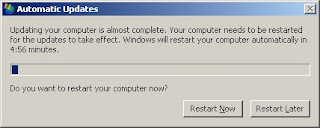
Now, to get rid of it:
Start / Run / gpedit.msc / Local Computer Policy / Computer Configuration / Administrative Templates / Windows Components / Windows Update / Re-prompt for restart with scheduled installations
Seems simple enough. Obviously you should still get to restarting your computer eventually, but really, Windows - how many times in an hour do we need to be reminded that you're desperate for our restarting attention? Just let us work.
* Gpedit changes can be risky.
Windows ask for restart because it finish updating your computer, most of those updates tag as security updates so it is very important to restart system after updating.
Nir
Credit: http://lifehacker.com
1) Disable per update:
Start=> Run => "Net stop wuauserv"
2) Removing the annoying Windows Update nag that pops up asking you over and over again whether you'd like to restart your computer now or later.

Now, to get rid of it:
Start / Run / gpedit.msc / Local Computer Policy / Computer Configuration / Administrative Templates / Windows Components / Windows Update / Re-prompt for restart with scheduled installations
Seems simple enough. Obviously you should still get to restarting your computer eventually, but really, Windows - how many times in an hour do we need to be reminded that you're desperate for our restarting attention? Just let us work.
* Gpedit changes can be risky.
Windows ask for restart because it finish updating your computer, most of those updates tag as security updates so it is very important to restart system after updating.
Nir
Credit: http://lifehacker.com
Subscribe to:
Posts (Atom)