Showing posts with label Delay. Show all posts

Saturday, June 6, 2009

Firefox Loading Slow

Recently i solved an annoying issue of my Firefox browser, it took ages to load it and there were unbearable delays when typing a url.
I saw many result for that problem over the net but non of them solved this.

Firefox auto-complete text field search at the bookmarks list and history.
As much as i know, Firefox's history saving time default value is 30 days and that was the first thing changed to 6, you should set this by the often you use your browser (for example: every morning i browse to the same 7 sites so there is no need to worry about deleting the history of those sites)
From now and on, the Firefox won't save history for more than 6 days but what about now?
All you have to do is getting into the History menu and then to Show All History,
Sort the list by last visit date or create date and delete the old items.
Restart Firefox
Now you should have a faster Firefox than before :)

Nir.
Monday, June 1, 2009

Right Click - Context Menu Loading Slow - Freeware

Two resolutions for this annoying problem:

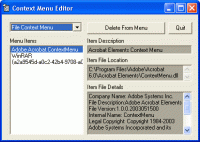
1) Context Menu Editor:
Context Menu Editor can view and delete links to programs on your context menus (the popup menus you see when you right-click). Context Menu Editor does not delete the programs, it just removes them from your menus. Menu deletions cannot be undone so please use with care - you may need to reinstall your software if you want them back. Context Menu Editor can view and delete menu items for right clicking on files, right clicking on folders and right clicking in Internet Explorer. Try Context Menu Editor today to see just how clean your menus can be!
Credit: http://www.bartdart.com/

Download: http://www.bartdart.com/downloads/contextmenueditorinstall.exe


2) ShellExView v1.37 - Shell Extensions Manager:

Shell Extensions are in-process COM objects which extends the abilities of Windows operating system. Most shell extensions are automatically installed by the operating system, but there are also many other applications that install additional shell extension components. For example: If you install WinZip on your computer, you'll see a special WinZip menu when you right-click on a Zip file. This menu is created by adding a shell extension to the system.

The ShellExView utility displays the details of shell extensions installed on your computer, and allows you to easily disable and enable each shell extension.


ShellExView can be used for solving context-menu problems in Explorer environment. For more information, read the following article: Right-click is slow or weird behavior caused by context menu handlers


Credit: http://www.nirsoft.net/utils/shexview.html

Download: http://www.nirsoft.net/utils/shexview_setup.exe


Nir.