Showing posts with label Freeware. Show all posts

Sunday, June 5, 2011

VisualBee - Your PowerPoint Presentation Solution

Don't get frustrated by PowerPoint ever again. The VisualBee plugin (add-in) is your solution.

Automatic Design


With A Single Click
VisualBee is so easy to use. Just insert your desired content to a blank PowerPoint presentation and press "enhance presentation".


Complete Control
You have total control over your final presentation. Review each slide of your enhanced presentation and modify its content as you see fit.


Keep Your Own Style
Select the different style and feel of your enhanced PowerPoint presentation best representing your own style.


Take The Credit
The final enhanced presentation is yours to keep and use. It is a regular PowerPoint presentation.

Credit: http://visualbee.com/index.php/products/overview.html

Nir.

Wednesday, October 27, 2010

Stream Transport - Watch your favorites. Anytime. For free

  • Widely support for overwhelming online videos
    The app is able to browse and download video clips from video hosting websites of HTTP, RTMP, RTMPT, RTMPE, RTMPTE protocol, and these cover overwhelming majority of websites such as Hulu, Veoh, Boxee, Joost, YouTube, Yahoo Video, CBS, etc.
  • Capture URL automatically
    The URL of any video clip that is playing will be auto-captured and listed out for your convenience, and you can download it with one click or just ignore it. There is no bother to add URL manually.
  • Enrich your A/V collection
    This FLV Downloader is capable of downloading almost any video and audio file you can play online so that you can turn numerous online video and audio into your own collection. The videos will be saved as FLV or MP4 format in your media library and a powerful player is inlaid for you to play them back freely.
  • Considerate task manager and view log
    The task manager lists detailed information of files such as name, size, progress, location etc and allows you to play, stop, delete and convert (full version) the FLV files downloaded. Auto shutdown is available as well. The view log makes it easier to manage your tasks.

Download & Credit: http://www.streamtransport.com

How to:

Hulu.com is very famous for its attracting video contents and also known as an undownloadable site which is using highly encrypt RTMP, and RTMPE protocols for video streaming. The new released free download tool, StreamTransport (used to be called Any FLV Downloader), will help you out and download whatever videos you like from Hulu, and more other video-sharing sites, such as YouTube, MySpace, Veoh, Yahoo!Video, etc. Here’s the guide on how to use this handy tool. You can download the installation program from http://www.streamtransport.com. Install and launch it.

1. Go to link. Type in the link of the video-sharing site you plan to go, and click Start button or press Enter on your keyboard to confirm. Here’s a Visit Hulu button which enables you go to Hulu.com with a single click.

2. URL detection. Click in the page where the wanted video is playing, and the program will detect the video URL automatically for you.

3. Create download task. Select the right URL in the detection list section and click Download to create a download task. There is detailed information of each video. For most streams, there will be ads before the main video. You can manually select the longer one and/ or latter one for the main video stream. And then, the Download window showing the progress of download will pop up.

4. Pause, Resume, Stop, Remove, and Locate video tasks. In Download window, you can monitor the process of the download. You can also stop, remove, or locate a downloading task. For the stopped tasks, you can also resume them, but the download will start again from the very beginning.
Note: This window can be minimized or closed without ending the downloading tasks. You can resume the monitor by clicking Show Tasks on the main interface of this video stream downloading tool.
5. Muli-task availability. You can download up to 5 videos at one time.
6. Play the downloaded video. The video you downloaded is .flv files. You can play them with Splayer, VLC player, or any other free FLV players.
7. What’s more you can do with the downloaded file? You can also convert the files into other format for playing with some video converters. Searching on Google Search, you will find plenty of free tools for it.

Download & Credit: http://www.streamtransport.com


Nir.

Thursday, October 8, 2009

ExtractNow: allows you to extract multiple archives

ExtractNow is a simple utility that allows you to extract multiple archives quickly and easily. ExtractNow is not a complete archival solution. It's main purpose it to allow the user to extract multiple archives easily.


Why wear out your clicking finger extracting files one by one when you can extract at once? ExtractNow does a fine job of bundling compressed files and extracting their contents in one fell swoop. ExtractNow has a clean, well-designed and easy-to-use interface. To extract files, simply drag and drop them into the main program window, or right-click the files while in Windows Explorer. ExtractNow supports the two most popular compression formats, ZIP and RAR, as well as a handful of other formats. Simple but not simplistic, this is a powerful and reliable program that will be of use to anyone who manages many compressed files.

(Download.com Editor's Review)

Thursday, September 24, 2009

Convert FLV to MP3 (Freeware)

Credit: http://www.convertflvtomp3.com/

Do you love some music in your Flash videos, and want to convert it to MP3 audio? This is small Flash tool can help you. This program titled "Convert FLV to MP3" can extract audio data from Flash video (.flv) files, and save it as normal MP3 audio files, you can play it with other audio players or portable MP3 players, for example: IPod, Zune, Song PSP, or play it in your mobile device, such as iPhone.

Why Need Convert FLV to MP3?

Flash video is the most popular video format in the internet; there have ton of Flash videos in the web, almost all the video sharing website use the Flash video (.flv) as the main video content format, for example: Youtube, Google Video, MySpace and more. In these Flash videos, there have many lovely music and audio. If you want to save these music on you pc, listen and share it with your latest portable mp3 player, you need one audio conversion tool for converting audio data from Flash video, this program "Convert FLV to MP3" is your need, it can meet all your wants, at the best, it is one completely FREE software, this product allows for free personal use only.

From Youtube Video to MP3

Convert FLV to MP3 provide one handy feature for youtube users, it can download and rip the audio from youtube webpage to mp3 files directly, you just need input one youtube webpage address (webpage URL, you can copy it from IE or Firefox address bar), and program will do everything for you. It is one useful function for all Youtube fans. There have a lot of music video on youtube, such as MTV (Music Video from your favorite artists), now you can get it as one MP3 file in minutes, so easy and so cool. The default output MP3 files use 128kbps, 44Mhz, stereo.

How to Use

This Flash audio conversion is easy to use very much. The first, you need select one Flash video (.flv) file as the source, if you want to convert from youtube directly, you need input a Youtube video webpage address (you can find this address from Internet Explorer or FireFox address bar, copy and paste here). The second, you need input one output MP3 file name, the extend name of this output file must be ",mp3". The finally, click the "Convert" button on the bottom of main interface, then Convert FLV to MP3 will start the conversion process, it will one process bar to tell user how much percent have completed. Program don't support batch conversion by now.

Screenshot of Convert FLV to MP3

Download

  • 100% Clean, does not contain any form of spyware, malware and adware
  • 100% Windows Vista compliant version
  • File Size is 2.76 MB
  • Completely Free
  • Download: convertflvtomp3_setup.exe


Credit: http://www.convertflvtomp3.com/

Nir.

Sunday, July 19, 2009

OutSync - syncs photos of your Facebook friends with Outlook - Freeware

OutSync is a free Windows application that syncs photos of your Facebook friends with matching contacts in Microsoft Outlook. It allows you to select which contacts are updated. So you can update all contacts at once or just a few at a time.

The main benefit of OutSync is for Windows Mobile users. Updated contacts are automatically synced with Windows Mobile devices by Exchange server or ActiveSync. Thus new and fun photos appear during calls and other places where contacts are used.

OutSync is compatible with Windows XP, Vista and Server 2003. It requires Outlook 2003 or 2007.

OutSync Screenshot


Visit the OutSync page on Facebook for discussions, reviews and more.

Download: http://www.melsam.com/outsync/

Credit: http://www.melsam.com


Nir.


Wednesday, July 8, 2009

Convert Subtitle Files 1.0 (Freeware)

The Convert Hebrew Files application was designed to convert Visual Hebrew (OEM) to Logical Hebrew (Ansi) and vice versa.
This program was made also to convert ripped Hebrew DVD subtitles.

How to use:

Drag the desired file to Convert.exe.
Follow the instructions on the screen.
The program will make a file named xxx - hebrew fix...
[read more >>]


Download: http://www.softpedia.com/get/System/File-Management/Convert-Hebrew-Files.shtml

Credit: softpedia.com

Nir.

Sunday, June 21, 2009

QRes - a command line utility that lets you change your screen setting (Freeware)

QRes is a command line utility that lets you change your screen resolution, color depth and refresh rate settings.

QRes provides automatic screen mode change for Windows applications. For instance, you can make QRes switch to 800 x 600 @ 256 colors as long as you run a game and switch back to your regular screen mode when it is over. Win32 app written in C/C++.


Credit and download:
http://sourceforge.net/projects/qres/


Credit and download:
http://www.softpedia.com/get/Multimedia/Video/Other-VIDEO-Tools/QRes.shtml


Nir.

Saturday, June 6, 2009

3DP Chip and 3DP Net - Drivers Update Util (Freeware)

3DP Net will be used to directly after re-installing windows, if you can't connect to the internet. 3DP Net is an integrated ethernet card driver that enables to use the internet through installing the driver easily.

3DP Chip uses to detect the driver of devices such as CPU/Motherboard/Video Card/Sound Card. If you connected to the internet successfully with 3DP Net, then download the lastest or most suitable driver through the internet with 3DP Chip.

Latest 3DP Chip Download Latest 3DP Net Download


Monday, June 1, 2009

Right Click - Context Menu Loading Slow - Freeware

Two resolutions for this annoying problem:

1) Context Menu Editor:
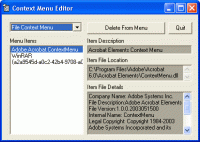
Context Menu Editor can view and delete links to programs on your context menus (the popup menus you see when you right-click). Context Menu Editor does not delete the programs, it just removes them from your menus. Menu deletions cannot be undone so please use with care - you may need to reinstall your software if you want them back. Context Menu Editor can view and delete menu items for right clicking on files, right clicking on folders and right clicking in Internet Explorer. Try Context Menu Editor today to see just how clean your menus can be!
Credit: http://www.bartdart.com/

Download: http://www.bartdart.com/downloads/contextmenueditorinstall.exe


2) ShellExView v1.37 - Shell Extensions Manager:

Shell Extensions are in-process COM objects which extends the abilities of Windows operating system. Most shell extensions are automatically installed by the operating system, but there are also many other applications that install additional shell extension components. For example: If you install WinZip on your computer, you'll see a special WinZip menu when you right-click on a Zip file. This menu is created by adding a shell extension to the system.

The ShellExView utility displays the details of shell extensions installed on your computer, and allows you to easily disable and enable each shell extension.


ShellExView can be used for solving context-menu problems in Explorer environment. For more information, read the following article: Right-click is slow or weird behavior caused by context menu handlers


Credit: http://www.nirsoft.net/utils/shexview.html

Download: http://www.nirsoft.net/utils/shexview_setup.exe


Nir.

Saturday, May 23, 2009

AVZ Antiviral Toolkit - Freeware

AVZ Antiviral Toolkit is a freeware application designed to delete adware and spyware modules, network worms, trojan horses (Trojan, TrojanDownloader, TrojanSpy) and Dialers. The utility implements specialized algorithms for detecting keyloggers, finding and blocking rootkits etc

script screenshot

You can also run scrips automatically to delete unwanted files.

Credit and download: http://www.xdelbox.com/how-to-remove-winupgro-or-winupgroexe/
Another link: http://www.softpedia.com/get/Antivirus/AVZ-Antiviral-Toolkit.shtml

Nir.

Sansa playlist creator - Freeware

This program enables you to create playlist directly from the content of your music folder on your sandisk sansa e200 series (e230, e240, e250, e280 etc...) MP3 players. The Program supports the mini SD card slot as well as the internal memory. The playlists are stored in the .pls format with all music files you put into the music folder.

Credit and download: http://download.cnet.com/Sansa-playlist-creator/3000-2169_4-10723962.html

Nir.

Saturday, May 16, 2009

JPEGsnoop - The Freeware JPEG File Decoding Utility will Fix your Corrupted JPEG Photos

Calvin Hass wrote in his blog about the developing of this great utility:


Don't worry! Many damaged JPEG photos can actually be fixed!

Corrupt Photos

Have you ever opened a photo on your hard drive, only to find that your JPEG image is now garbled by colors and lines, banding or shifted? ... Worse yet, the photo won't even open and instead reports an error?

Typical Error Messages Indicating Corruption

  • No Preview Available - Windows Explorer
  • Drawing Failed - Windows Picture & Fax Viewer
  • This document may be damaged (the file may be truncated or incomplete) - Photoshop
  • Can't read file header! Unknown file format or file not found! - IrfanView
  • Could not complete your request because an unknown or invalid JPEG marker type is found - Photoshop

Fixing Corrupt Photos

During the development of JPEGsnoop (a JPEG analysis tool), I began to question whether it was at all possible to fix images that have had errors in the scan segment (JFIF SOS) bitstream. After significant analysis and tool development, I am happy to report that I am now able to correct many of these photos!

Unique Correction Technique!

While there are dozens of software utilities available on the web that advertise that they fix or recover corrupt JPEGs, I am not yet aware of any that actually correct scan bitstream errors (as shown in the samples below). In nearly all cases, these programs will recover the files from deletion (stitching file clusters together) but you may still be left with a damaged JPEG image!

I believe my technique to be unique and hence the reason I decided to post this page and share my services. Photos can often be fixed with virtually no degradation to the original image!

Examples of Repaired Photos

The following shows a few examples of photos that I have successfully recovered. In some cases, as many as 100 errors in the scan segment have been corrected. None of the digital images below had Restart Markers in their bitstreams or misplaced file clusters.

Original Damaged PhotoAfter Fixing JPEG


What can I do?

Check out a few of the many possible uses for JPEGsnoop!

One of the latest features in JPEGsnoop is an internal database that compares an image against a large number of compression signatures. JPEGsnoop reports what digital camera or software was likely used to generate the image. This is extremely useful in determining whether or not a photo has been edited / tampered in any way. If the compression signature matches Photoshop, then you can be pretty sure that the photo is no longer an original! This type of analysis is sometimes referred to as Digital Image Ballistics / Forensics.

JPEGsnoop reports a huge amount of information, including: quantization table matrix (chrominance and luminance), chroma subsampling, estimates JPEG Quality setting, JPEG resolution settings, Huffman tables, EXIF metadata, Makernotes, RGB histograms, etc. Most of the JPEG JFIF markers are reported. In addition, you can enable a full huffman VLC decode, which will help those who are learning about JPEG compression and those who are writing a JPEG decoder.

Other potential uses: determine quality setting used in Photoshop Save As or Save for Web settings, increasing your scanner quality, locating recoverable images / videos, decoding AVI files, examining .THM files, JPEG EXIF thumbnails, extract embedded images in Adobe PDF documents, etc.

File Types Supported

JPEGsnoop will open and attempt to decode any file that contains an embedded JPEG image, such as:

  • .JPG - JPEG Still Photo
  • .THM - Thumbnail for RAW Photo / Movie Files
  • .AVI* - AVI Movies
  • .DNG - Digital Negative RAW Photo
  • .CRW, .CR2, .NEF, .ORF, .PEF - RAW Photo
  • .MOV* - QuickTime Movies, QTVR (Virtual Reality / 360 Panoramic)
  • .PDF - Adobe PDF Documents

* Note that video file formats (such as .AVI and .MOV) are containers, which can include video streams encoded in one of a wide variety of codecs. JPEGsnoop can only interpret this video footage if the codec used is based on Motion JPEG (MJPG).


Credit: http://www.impulseadventure.com/photo/fix-corrupt-jpeg-photo.html

http://www.impulseadventure.com/photo/jpeg-snoop.html

Download: http://www.impulseadventure.com/dl.php?file=JPEGsnoop_v1_4_0.zip


Nir.

Saturday, March 14, 2009

AVG Remover utility - Freeware

AVG Remover utility removes all parts of AVG installation on your computer, including registry items, installation and user files on your disk, etc. AVG Remover is the least option to be used in case the AVG uninstallation / repair installation process has failed repeatedly.

Warning

All AVG user settings will be removed after the uninstallation, as well as the Virus Vault content and other item related to AVG installation and use. During the removal procedure you will be asked to restart your computer. Therefore please make sure to finish your work and to save all important data prior to AVG Remover launch.


Downloads and more info: http://www.avg.com/download-tools

Nir.

Thursday, March 12, 2009

WhyReboot - Freeware

WhyReboot is a small (~100KB) Windows application that helps you decide whether to reboot your computer after running an installer. It does this by displaying a list of "pending file operations" (rename, delete, etc) that will occur after rebooting your computer. Quite often, no reboot is really needed.
http://exodusdev.com/sites/default/files/whyreboot-screen-1.0.1.537-thumb.jpg

Download (http://exodusdev.com)


Nir.

Uninstall your unwanted applications easily and completely - Freeware

Absolute Uninstaller

Automatically detect unused files left by uninstaller and completely delete them
Very fast speed listing programs,no need to wait.
Autofix invalid program entries.
List installed programs with appropriate icons
Simple and User friendly interface

Absolute Uninstaller is similar to standard Windows Add/Remove program but more powerful.The standard Add/Remove program can't uninstall applications completely which often leaves broken registry keys ,unnecessary files on the hard disk.The more junk files your computer have ,the slower it runs. Uninstall Manager can wipe off all the junk files clearly in seconds.It offers a more user-friendly way to remove unneeded applications and to improve your computer efficiency.

Completely Uninstall

The Standard Add/Remove Program often can't uninstall applications completely .It often leave files on the hard drive ,associated desktop icons, Start menu entries and keys in the registry. Big registry and large number of unnecessary files make the system slower and slower. Uninstall Manager can clear them in seconds!

Fast and User-Friendly

Absolute Uninstaller starts up more faster than Add/Remove program with all appropriate icons of the application loaded and marks recently installed program. so that you can easily find out the application you want to uninstall. You may also look up the application you want through a handy search function.

Nir.


Credit: http://www.glarysoft.com/au.html


Sunday, February 8, 2009

SUMo 2.4.3.69 - Software Update Monitor (freeware)

Summary

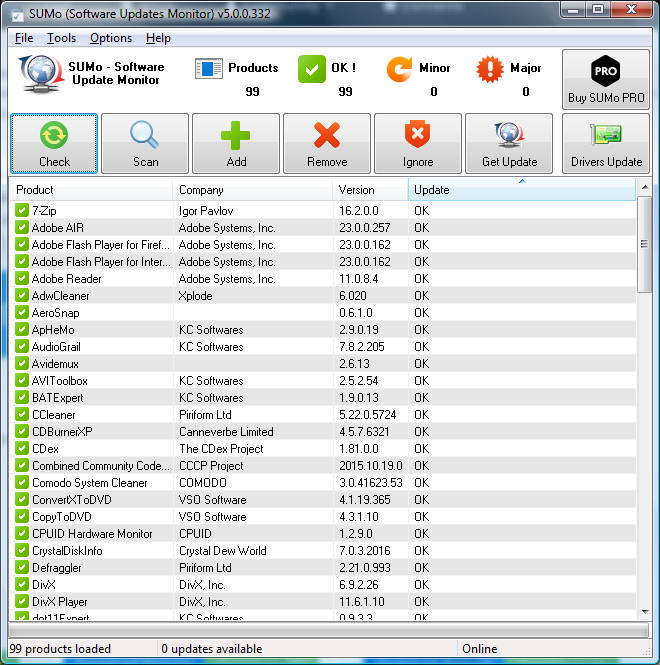
SUMo, which stands for Software Update Monitor. Thanks to SUMo you'll be able to keep your PC up-to-date by using the most recent version of your favorite software ! Unlike build-in auto update features, SUMo tells you if updates are available before you need to use your software.

Features

  • Automatic detection of installed software
  • Detects required updates / patchs for your software
  • Filter / authorize Beta versions (user setting)
  • Ignore list : only tracks software YOU want to track
  • More compatibility and less false positive than others Update Monitors (according to users feedback ;-)
  • Internationalization support.

Awards

Gizmo's Top Pick

Translations (included in installation package)
(if you want to become a translator for this software : click here)

Screenshot

click to enlarge

[ Download ]

Nir

Credit: http://www.kcsoftwares.com/index.php?sumo