Showing posts with label Fix. Show all posts

Monday, June 1, 2009

Right Click - Context Menu Loading Slow - Freeware

Two resolutions for this annoying problem:

1) Context Menu Editor:
Context Menu Editor can view and delete links to programs on your context menus (the popup menus you see when you right-click). Context Menu Editor does not delete the programs, it just removes them from your menus. Menu deletions cannot be undone so please use with care - you may need to reinstall your software if you want them back. Context Menu Editor can view and delete menu items for right clicking on files, right clicking on folders and right clicking in Internet Explorer. Try Context Menu Editor today to see just how clean your menus can be!
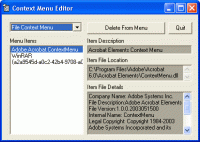
Credit: http://www.bartdart.com/

Download: http://www.bartdart.com/downloads/contextmenueditorinstall.exe


2) ShellExView v1.37 - Shell Extensions Manager:

Shell Extensions are in-process COM objects which extends the abilities of Windows operating system. Most shell extensions are automatically installed by the operating system, but there are also many other applications that install additional shell extension components. For example: If you install WinZip on your computer, you'll see a special WinZip menu when you right-click on a Zip file. This menu is created by adding a shell extension to the system.

The ShellExView utility displays the details of shell extensions installed on your computer, and allows you to easily disable and enable each shell extension.


ShellExView can be used for solving context-menu problems in Explorer environment. For more information, read the following article: Right-click is slow or weird behavior caused by context menu handlers


Credit: http://www.nirsoft.net/utils/shexview.html

Download: http://www.nirsoft.net/utils/shexview_setup.exe


Nir.

Saturday, May 16, 2009

JPEGsnoop - The Freeware JPEG File Decoding Utility will Fix your Corrupted JPEG Photos

Calvin Hass wrote in his blog about the developing of this great utility:


Don't worry! Many damaged JPEG photos can actually be fixed!

Corrupt Photos

Have you ever opened a photo on your hard drive, only to find that your JPEG image is now garbled by colors and lines, banding or shifted? ... Worse yet, the photo won't even open and instead reports an error?

Typical Error Messages Indicating Corruption

  • No Preview Available - Windows Explorer
  • Drawing Failed - Windows Picture & Fax Viewer
  • This document may be damaged (the file may be truncated or incomplete) - Photoshop
  • Can't read file header! Unknown file format or file not found! - IrfanView
  • Could not complete your request because an unknown or invalid JPEG marker type is found - Photoshop

Fixing Corrupt Photos

During the development of JPEGsnoop (a JPEG analysis tool), I began to question whether it was at all possible to fix images that have had errors in the scan segment (JFIF SOS) bitstream. After significant analysis and tool development, I am happy to report that I am now able to correct many of these photos!

Unique Correction Technique!

While there are dozens of software utilities available on the web that advertise that they fix or recover corrupt JPEGs, I am not yet aware of any that actually correct scan bitstream errors (as shown in the samples below). In nearly all cases, these programs will recover the files from deletion (stitching file clusters together) but you may still be left with a damaged JPEG image!

I believe my technique to be unique and hence the reason I decided to post this page and share my services. Photos can often be fixed with virtually no degradation to the original image!

Examples of Repaired Photos

The following shows a few examples of photos that I have successfully recovered. In some cases, as many as 100 errors in the scan segment have been corrected. None of the digital images below had Restart Markers in their bitstreams or misplaced file clusters.

Original Damaged PhotoAfter Fixing JPEG


What can I do?

Check out a few of the many possible uses for JPEGsnoop!

One of the latest features in JPEGsnoop is an internal database that compares an image against a large number of compression signatures. JPEGsnoop reports what digital camera or software was likely used to generate the image. This is extremely useful in determining whether or not a photo has been edited / tampered in any way. If the compression signature matches Photoshop, then you can be pretty sure that the photo is no longer an original! This type of analysis is sometimes referred to as Digital Image Ballistics / Forensics.

JPEGsnoop reports a huge amount of information, including: quantization table matrix (chrominance and luminance), chroma subsampling, estimates JPEG Quality setting, JPEG resolution settings, Huffman tables, EXIF metadata, Makernotes, RGB histograms, etc. Most of the JPEG JFIF markers are reported. In addition, you can enable a full huffman VLC decode, which will help those who are learning about JPEG compression and those who are writing a JPEG decoder.

Other potential uses: determine quality setting used in Photoshop Save As or Save for Web settings, increasing your scanner quality, locating recoverable images / videos, decoding AVI files, examining .THM files, JPEG EXIF thumbnails, extract embedded images in Adobe PDF documents, etc.

File Types Supported

JPEGsnoop will open and attempt to decode any file that contains an embedded JPEG image, such as:

  • .JPG - JPEG Still Photo
  • .THM - Thumbnail for RAW Photo / Movie Files
  • .AVI* - AVI Movies
  • .DNG - Digital Negative RAW Photo
  • .CRW, .CR2, .NEF, .ORF, .PEF - RAW Photo
  • .MOV* - QuickTime Movies, QTVR (Virtual Reality / 360 Panoramic)
  • .PDF - Adobe PDF Documents

* Note that video file formats (such as .AVI and .MOV) are containers, which can include video streams encoded in one of a wide variety of codecs. JPEGsnoop can only interpret this video footage if the codec used is based on Motion JPEG (MJPG).


Credit: http://www.impulseadventure.com/photo/fix-corrupt-jpeg-photo.html

http://www.impulseadventure.com/photo/jpeg-snoop.html

Download: http://www.impulseadventure.com/dl.php?file=JPEGsnoop_v1_4_0.zip


Nir.